 English
 বাংলা
বাংলা Čeština
 Dansk
Dansk Deutsch
 Español
 Français
 हिन्दी
 Magyar
 Bahasa Indonesia
 Italiano
 日本語
日本語 한국어
한국어 Norsk bokmål
 Nederlands
 Polski
 Português
 Română
 Русский
 Slovenčina
 Slovenščina
 Svenska
 Türkçe
 Tiếng Việt
 中文
中文MAIL — Mail
MAIL IMAP and POP3 mailboxes are browsed like folders: one folder per mailbox, one file per message.
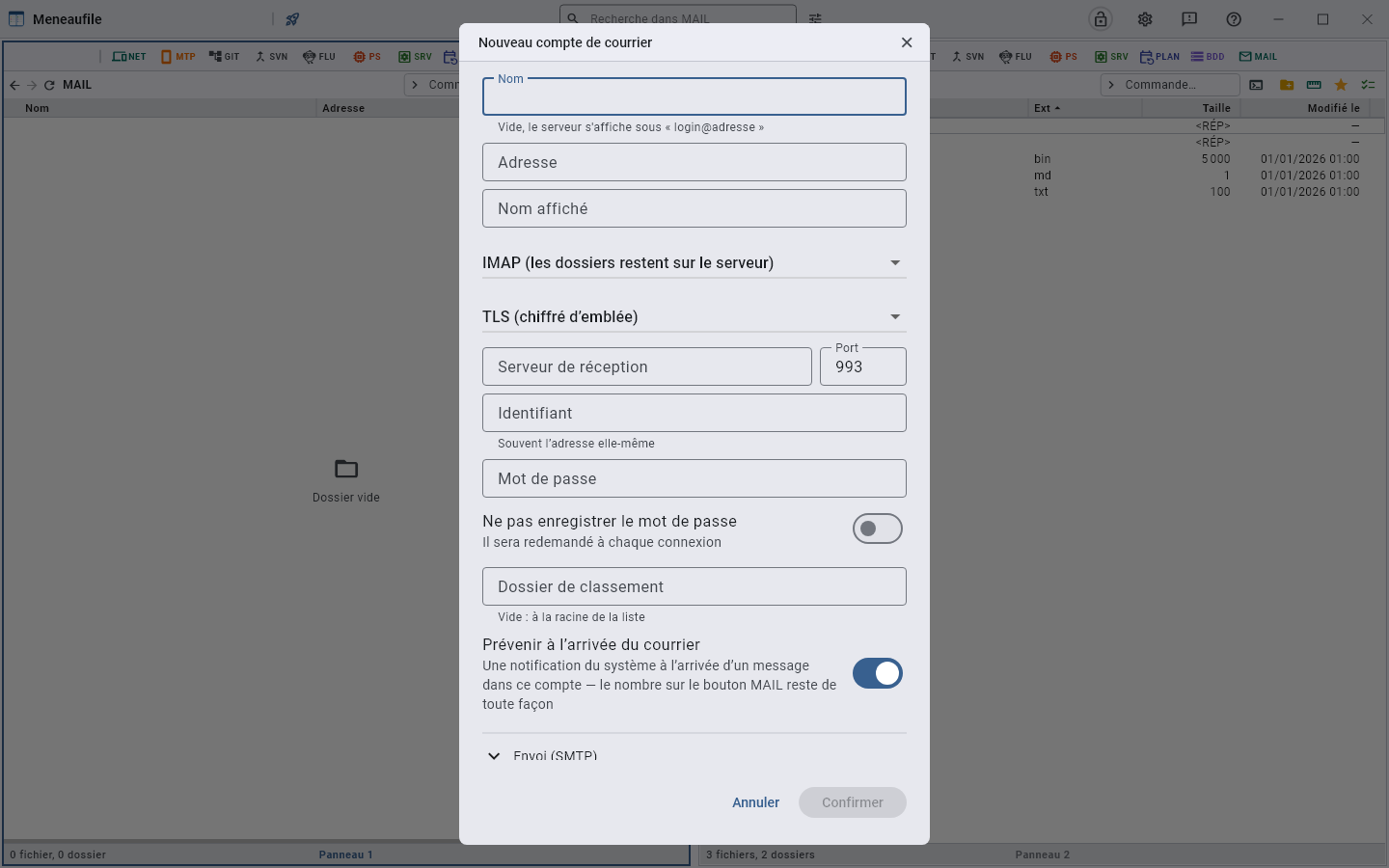
Declaring an account
The address, the display name, the protocol — IMAP leaves the folders on the server, POP3 downloads a single list —, and the encryption: TLS from the start, STARTTLS afterwards, or none. Sending (SMTP) has its own section; left empty, it reuses the reading account.
The big providers
The settings of the most widespread mail services in France, all with TLS from the start on these ports. The account is the full address, unless stated otherwise; the password is the mail service’s own — or, for Gmail, Yahoo and iCloud, an app password generated in the account’s security settings, the usual password being refused there for software.
| Provider | IMAP | POP3 | SMTP | Account |
|---|---|---|---|---|
| Orange (orange.fr, wanadoo.fr) | imap.orange.fr 993 | pop.orange.fr 995 | smtp.orange.fr 465 | the address |
| Free | imap.free.fr 993 | pop.free.fr 995 | smtp.free.fr 465 | the username, without @free.fr |
| SFR (sfr.fr, neuf.fr) | imap.sfr.fr 993 | pop.sfr.fr 995 | smtp.sfr.fr 465 | the address |
| Bouygues Telecom (bbox.fr) | imap.bbox.fr 993 | pop.bbox.fr 995 | smtp.bbox.fr 465 | the address |
| La Poste (laposte.net) | imap.laposte.net 993 | pop.laposte.net 995 | smtp.laposte.net 465 | the address |
| Gmail | imap.gmail.com 993 | pop.gmail.com 995 | smtp.gmail.com 465 | the address, app password |
| Yahoo Mail | imap.mail.yahoo.com 993 | pop.mail.yahoo.com 995 | smtp.mail.yahoo.com 465 | the address, app password |
| iCloud Mail | imap.mail.me.com 993 | — | smtp.mail.me.com 587, STARTTLS | the address, app password |
| OVHcloud (hosting) | ssl0.ovh.net 993 | ssl0.ovh.net 995 | ssl0.ovh.net 465 | the address |
| Infomaniak | mail.infomaniak.com 993 | mail.infomaniak.com 995 | mail.infomaniak.com 465 | the address |
| Gandi | mail.gandi.net 993 | mail.gandi.net 995 | mail.gandi.net 465 | the address |
The STARTTLS ports, when a provider prefers them: 143 for IMAP, 110 for POP3, 587 for SMTP. With Gmail, IMAP must be enabled in the mail settings, and two-step verification in place before generating the app password. Outlook.com, Hotmail and Live now accept only “modern” authentication (OAuth), which Meneaufile does not speak: the password alone is refused there. Meneaufile authenticates with a password — AUTHENTICATE PLAIN or LOGIN —, always under encryption.
Read
A message opens with F3 like a file. Attachments are rows: you copy them to a panel like everything else. The columns show the state — unread, replied, flagged, draft, attachment — and “Mark as read” or “Mark as unread” changes it.
The message is read on white paper, whatever the theme — dark as well as light: a light theme draws its surface from the chosen tint, and mail would have been read on pink or pale blue. A plain-text message keeps its fixed-width font, as in a webmail, and wraps: long lines fit in the box instead of running off to the right, and the sender’s line breaks stay the sender’s. An address written out in full is clickable — http:// or https://, and nothing else: guessing an address from a dot would turn every file name mentioned into a link. The full stop that ends the sentence stays with the sentence.
Write
“New message…”, “Reply”, “Reply all”, “Forward”: recipients, copy, subject, body, attachments. An account with no sending server says so — you have to declare one to write from it.
The three actions are in the reading box, at the top right, and on the right-click of a row. “Reply” writes to the sender only, “Reply all” adds the other recipients. Replying closes the reading and opens the writing, quote included.
What happens in the meantime
Every five minutes, Meneaufile asks the servers again what is waiting, and the MAIL button carries the number of unread messages as a badge. Nothing is downloaded: it is counts that are requested, a few bytes per folder. The trash, spam, drafts and sent folders do not count.
Hovering says which mailbox is waiting: the total first, the one the badge carries, then one line per account. With four mailboxes, “12” did not say which to open. A single mailbox keeps its single line, and an account that did not answer has no line — zero would say “nothing is waiting for you”, which is precisely what we do not know about it.
F5 does not wait for the five minutes. Refreshing in mail asks the server again for the account’s folders, their unread counts and their totals: the badge, the folder numbers and the list agree at once. Without it they were kept once and for all, and only the next poll put them right again — you refreshed in front of your mailbox, and nothing moved.
With the vault closed, the watcher stays quiet: the accounts’ passwords sleep there, and it is not for a timer to wake that door.
A folder’s columns
Subject, sender, Date, size, state, identifier. The Date is the one the sender announces: it is the one every client shows, and the sort is done on the server.
Two more columns can be requested in the columns menu, hidden by default because seven columns already fit poorly in a panel:
- Received: when the server received it. The two dates usually differ by a second, by three days when a relay dragged its feet, and by twenty years when the clock on the other end is wrong.
- Read on: when you read it. The protocol does not say — it knows that a message is read, never when —, so it is Meneaufile that records it, at the moment it sets the flag. A message read elsewhere, in webmail or on the phone, therefore arrives read and without a date: that is more honest than an invented date. It is stored next to the messages, in
lu.json: on a USB stick, it travels with them.
Recovering an account’s password
The account list never gives a password back. To read it again — to reconfigure a phone, another application — you copy the account into the NET list: F6 to a view set on it, or drag. The entry carries the account’s name, the username, the address of the reading server, the sending server as a comment, and the password.
Into the filing folder open opposite, and not at the root of the list: that is where you will look for it afterwards. Moving is not possible — the account would have to be removed from its list to be placed in the vault, whereas what is stored there is a duplicate of the password; Ctrl+F6 says so instead of silently copying.
What stays on the server
Removing an account takes it off the list, its password with it. The mailbox itself stays intact on the server.
Meneaufile manual, in English.