 English
 বাংলা
বাংলা Čeština
 Dansk
Dansk Deutsch
 Español
 Français
 हिन्दी
 Magyar
 Bahasa Indonesia
 Italiano
 日本語
日本語 한국어
한국어 Norsk bokmål
 Nederlands
 Polski
 Português
 Română
 Русский
 Slovenčina
 Slovenščina
 Svenska
 Türkçe
 Tiếng Việt
 中文
中文The context menu
A single menu, wherever you click: on a row, on the breadcrumb, on [..], in the blank of the list. Two menus that look alike without being identical force you to read to know which one you have; this one is memorised.
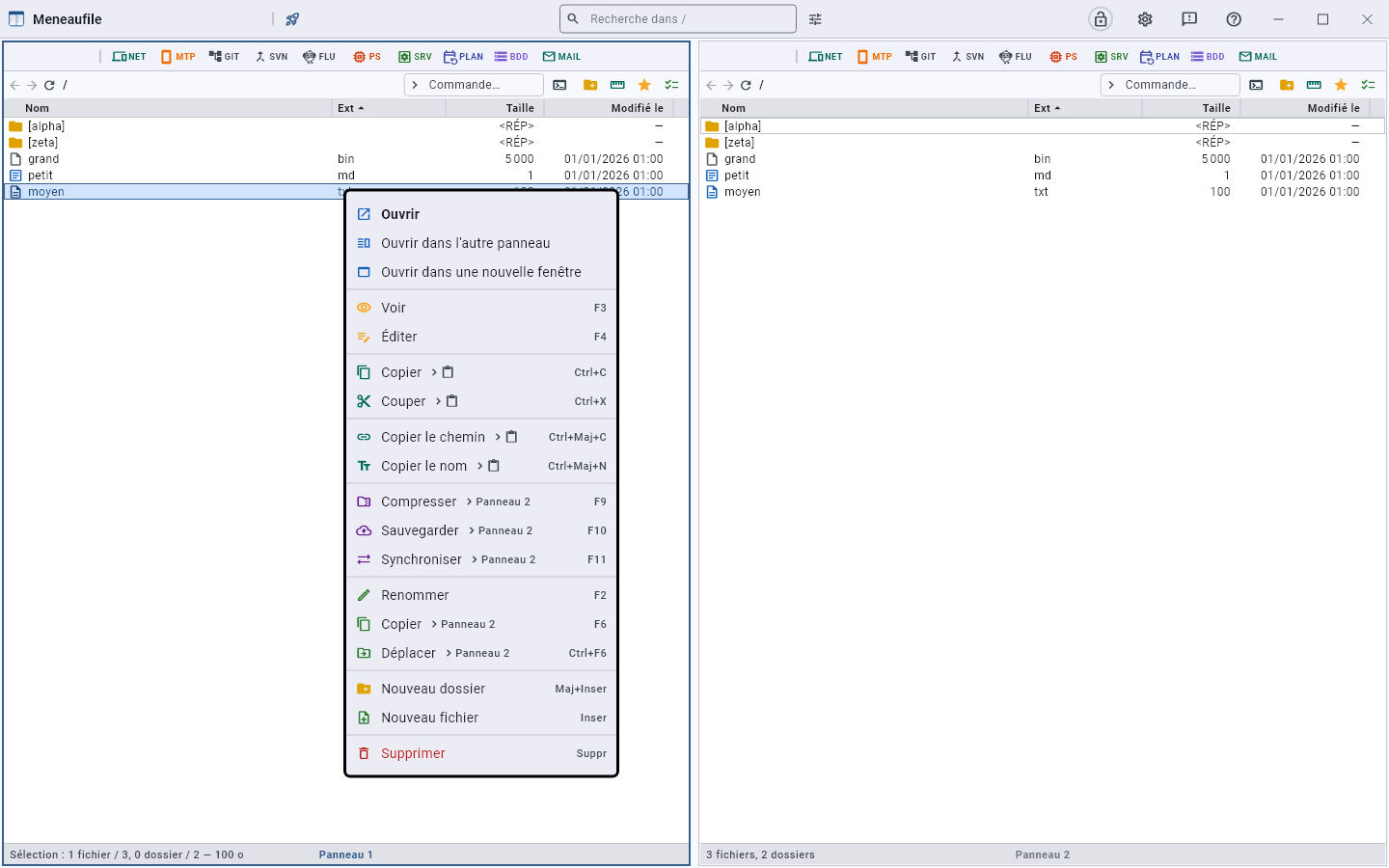
Three “Copy” entries, and what tells them apart
The word serves three actions that do not send to the same place. The menu therefore adds the destination after a “›”, rather than lengthening the labels:
| Entry | Where it goes | Key |
|---|---|---|
| Copy › Panel 2 | The files, in the other view | F5 |
| Copy › clipboard | The files, to paste elsewhere — including outside Meneaufile | Ctrl+C |
| Copy path › clipboard | Text: the path | Ctrl+Shift+C |
The destination view shows on every action that writes elsewhere — Copy, Move, Compress, Back up, Synchronise: with two views, “› Panel 2”; with three or four, “› Panels”, because the question comes when you act, and naming a view in advance would announce what is not yet known.
“Cut” (Ctrl+X) goes with copy, and “Paste” (Ctrl+V) appears only if the clipboard holds files — an entry that can only answer “The clipboard holds no file” teaches you to stop clicking.
A separator sets the two apart: above, the files themselves, bytes that you paste back into a folder; below, their text, characters that you paste back into a sentence. The “›” says where each one sends, the separator says these are two different things.
Paste fills the folder you pointed at, without entering it: right-click a folder, “Paste”, and it goes inside. On a file, there is nothing to fill — the displayed folder receives, like Ctrl+V.
What is not there
What does not apply: a database row cannot be compressed, a process cannot be renamed. An absent entry says the same thing as a refusal, but sooner.
The colours
| Tint | Family | For example |
|---|---|---|
| Blue | What opens | Open, Open in its location |
| Amber | What reads | View, Compare, Properties |
| Green | What creates or moves | Copy, New folder |
| Red | What destroys | Delete, Empty |
With no label to reread, it is the colour that lets you aim right the first time.
The variants
- Ctrl+right-click opens the Windows menu, the Explorer one, without going through ours.
- Holding Shift makes the technical entries appear — “Run as administrator” —, as in Explorer.
Meneaufile manual, in English.