 English
 বাংলা
বাংলা Čeština
 Dansk
Dansk Deutsch
 Español
 Français
 हिन्दी
 Magyar
 Bahasa Indonesia
 Italiano
 日本語
日本語 한국어
한국어 Norsk bokmål
 Nederlands
 Polski
 Português
 Română
 Русский
 Slovenčina
 Slovenščina
 Svenska
 Türkçe
 Tiếng Việt
 中文
中文The queue
Every long action — copy, move, delete, compress, extract, synchronise, export a database — goes into a queue: only one runs at a time, the following ones wait their turn. A setting makes them all start together. You keep working in the meantime.
One task at a time, or all together
By default, the queue plays the tasks in order of arrival, one at a time. Two tasks sharing the same medium each go slower than a single one, and the report reads in order: you know what was done, and when.
Everything at once is requested in the settings, in the “Tools” section. Each task then starts as soon as it arrives, without waiting for the others. It is what you want when they compete for nothing — an upload to a server while you decompress, two transfers on two different media. The setting applies to what follows: changing it while a task is running stops nothing.
Launching an action while a task is running is never refused: a thumbnail flies to the queue button, at the top of the window. The action has been taken, it waits its turn, and that is where you follow it.
The queue button
In the title bar, it exists only while there is work; with nothing left to read, it disappears. It carries the progress of the running task — a ring, which spins idly as long as nothing has moved yet — and, as a badge, the number of tasks remaining. A click opens the list.

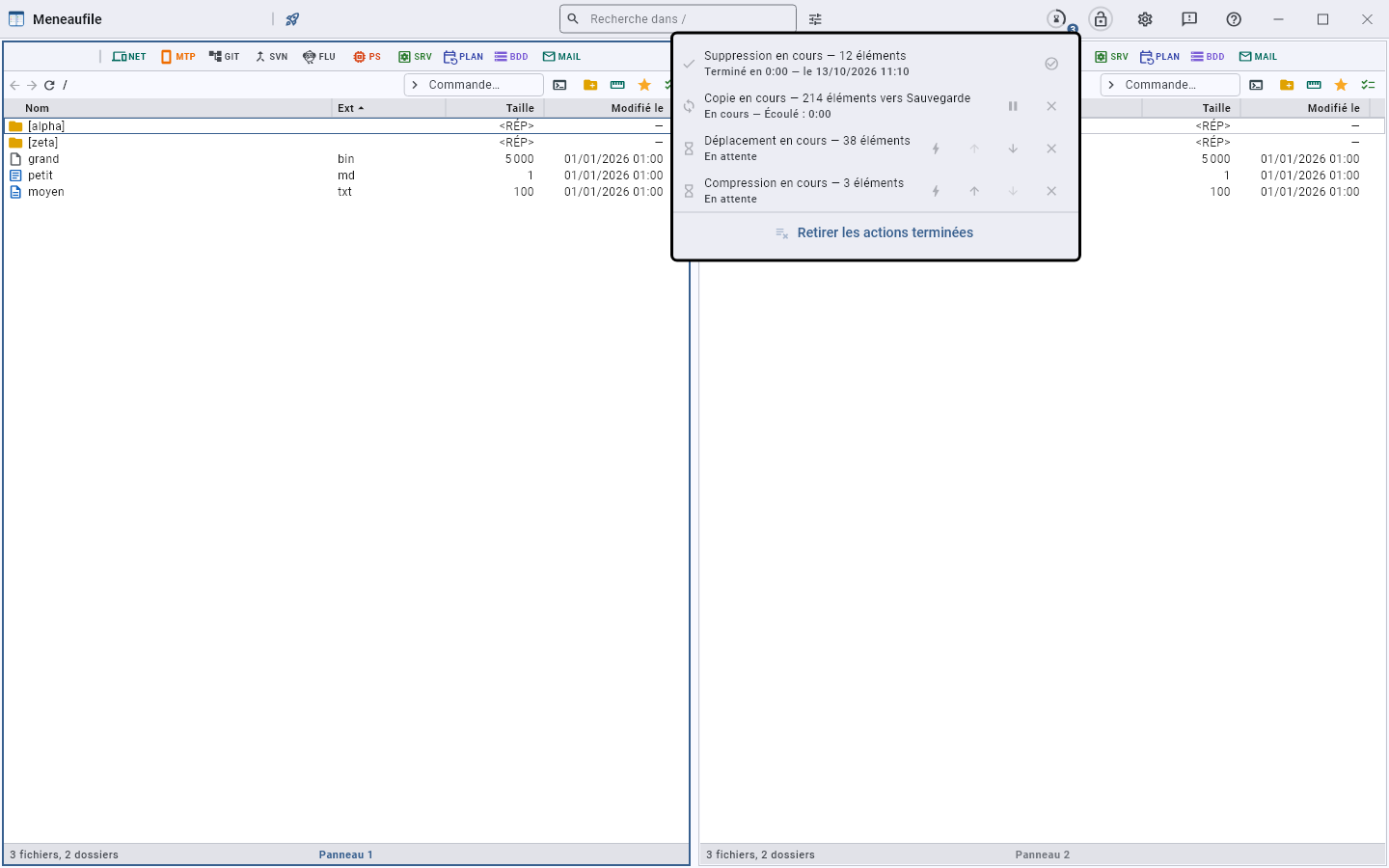
One row per action: what it does, where it stands — “Running” and the elapsed time, “Waiting”, “Paused”, “Finished in 12 s — 11/09 at 14:02” — and its controls, which act without closing the list:
- Pause and Resume, on the running task.
- Cancel: a task that was waiting leaves without having started. If the work does not give control back — a question left unanswered, a blocked call —, a second request wins out and the row closes.
- Move up or move down in the queue, for those that are waiting: the running task has already written, moving it back would undo nothing.
- Force: start now, without waiting for its turn. A small task behind an hour-long transfer has no reason to wait; it leaves the queue and runs alongside, and the order of the others does not change.
- Remove from the list, one by one, or Remove finished actions all at once. A finished task does not disappear by itself: its duration and its outcome are exactly what you come to read when you return to the queue.
The progress dialog
The first task opens its dialog: the current file, the progress, the elapsed time, the throughput, what remains. Pause suspends it, Background tucks it into the queue button — the thumbnail flies there —, Cancel stops it. A task that has waited its turn does not pop up its dialog when it arrives: you were working elsewhere in the meantime. The queue brings it back by itself when the task has a question to ask — a file that already exists is not replaced without an answer.
The same request twice
A deletion sent to the queue without showing anything, and the key pressed three times: the second request does not make a second task. Meneaufile says so — “Task already waiting” — rather than doing everything twice, especially for what destroys.
What does not take a turn
A folder comparison only reads: it does not take the turn of a copy and runs alongside. Sent to the background, it still appears in the list — without that, its result would pop up minutes later, and you would think something had hung.
Closing while a task is running
The window asks first: “Tasks are still running”. Closing interrupts them, and what they were writing stays half-written. The queue does not resume at the next startup, and that is intended: replaying a copy interrupted in the middle of a file requires knowing where it stood — which the disk does not say —, and replaying a deletion would destroy what you may just have restored. Each task does, however, leave its line in the log, with its outcome: the next day is when you ask what happened.
Meneaufile manual, in English.